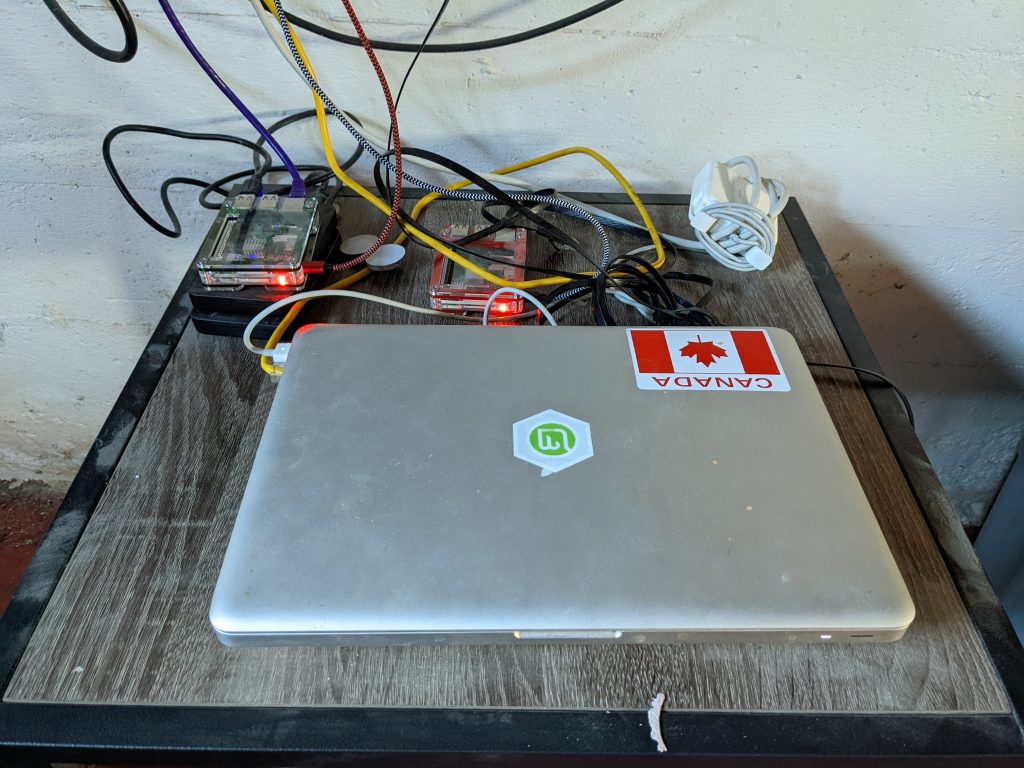
There’s a certain kind of satisfaction that comes from taking something old and making it do something remarkable. This is the story of how a 2008 MacBook 13” aluminum — a machine that predates the iPhone App Store — ended up running a multi-threaded, self-healing, boot-persistent IP threat blocking system protecting a production web server on Ubuntu 24.04. It took a full day of iterative development, a fair amount of debugging, and one very honest conversation about an 18-year-old piece of hardware.
The Starting Point
The project began with a script called Enterprise Shield v11.4. On paper it did what it promised: it blocked traffic from hostile Autonomous System Numbers (ASNs) and geographic regions by maintaining a massive ipset of known-bad IP ranges, then dropping packets matching that set at the firewall level. In practice, it was held together with duct tape.
The first code review found problems at every layer. There was a truncated grep statement in the country block loop — a literal syntax error that prevented the script from ever completing. The leading-zero stripping logic for CIDR normalisation ran in the wrong order, cleaning data after the validation regex had already rejected it. The script injected custom iptables rules directly while also running ufw --force reset, meaning UFW silently wiped those rules on every reload. And perhaps most practically damaging: it fetched IP data for every ASN serially, sleeping two seconds between each query, making a large blocklist a multi-hour operation.
The objective was clear: fix everything, make it fast, make it resilient, and make it understand its own hardware.
Understanding the Hardware
Before optimising anything, we needed to understand what we were working with. The machine is a 2008 MacBook with a Core 2 Duo processor — a 64-bit dual-core chip from the era when 4GB of RAM was considered ambitious. This one has been upgraded to 8GB, which turned out to matter significantly for one specific decision later.
The Core 2 Duo changes the calculus on parallelism. Modern CPUs handle process spawning cheaply. On a processor from 2008, every subprocess fork is measurably expensive, and context switching between background jobs has real overhead. This shaped nearly every optimisation decision that followed: eliminate unnecessary subprocess forks, use bash builtins instead of external binaries wherever possible, and be conservative with thread counts.
It also runs Ubuntu Server 24.04, which introduced a subtle wrinkle: the system ships with iptables-nft, a compatibility shim that translates iptables commands into nftables rules. Early in the project we suspected this would break the ipset integration — specifically the --match-set rule that does the actual packet dropping. A quick check of the live chain output confirmed it was working:
93 5448 DROP ... match-set blocked_asns src
Those 93 drops told us the integration was solid. We moved on.
Phase 1: Making It Correct
The first rewrite — v11.5 — focused entirely on correctness before touching performance.
The truncated grep was fixed. The UFW/iptables conflict was documented and mitigated by injecting the ipset DROP rule into /etc/ufw/before.rules, making it survive UFW reloads. The leading-zero stripping was reordered so it ran before validation, not after. The ipset restore file was given a flush directive so stale entries from previous partial runs couldn’t accumulate. The country feed fetches were given --fail flags so 404 error pages didn’t silently pass through as IP data.
Most importantly: the script was given a proper trap ... EXIT so temp files were always cleaned up, the root check was moved to the absolute first line, and every (( counter++ )) was replaced with counter=$(( counter + 1 )) — because in bash, arithmetic that evaluates to zero returns exit code 1, which set -e interprets as a fatal error.
Phase 2: Making It Fast
With a correct foundation, the next challenge was the whois lookup bottleneck. The serial version queried RADB one ASN at a time with a two-second sleep between each. With 152 ASNs in the blocklist, that’s over five minutes of wall clock time before any actual data processing begins.
The first parallel version — v11.6 — used export -f to pass a bash worker function into xargs -P subshells. It looked right. It wasn’t. On many systems, xargs subshells don’t reliably inherit exported bash functions. Workers spawned successfully, registered their completion files, and wrote nothing. The blocklist came back at roughly one-third of its expected size. The failure was completely silent.
The fix was architectural. Instead of relying on function inheritance, the worker logic was written to a self-contained bash script at runtime — /tmp/shield_whois_worker.sh — and each background job executed that file directly. No inheritance, no environment dependencies, no silent failures.
The second parallel problem was subtler: all threads were hitting RADB simultaneously, triggering connection throttling that caused empty responses with no error code. RADB doesn’t say “rate limited.” It just stops returning data. The solution was per-worker random jitter (0–2.5 seconds) combined with inter-batch pausing — every 20 dispatches, all active workers drain and a 3-second pause lets RADB’s connection count settle before the next batch opens.
The final thread count settled at 4. Eight threads was causing the silent data loss. Four threads with batching gives full coverage with no throttling, and on a Core 2 Duo the overhead of managing 4 concurrent background jobs is well within budget.
Phase 3: Making It Resilient
A firewall system that runs once nightly creates a specific failure mode: if something goes wrong with a data source — RADB is slow, a country feed returns an error, the network hiccups — the next scheduled run could silently shrink the blocklist without anyone noticing.
The delta check was the answer. After every run, the entry count is written to /var/lib/shield/last_entry_count. The following night, before committing the new ruleset, the script compares. If the new count is more than 10% below the previous run, the atomic swap is aborted entirely — the existing live ipset is preserved untouched — and an alert is written to a separate log file.
“Atomic swap” is the key phrase here. The shield script never modifies the live ipset directly. It builds a complete replacement set in /tmp, populates it, then executes ipset swap blocked_asns-temp blocked_asns — a single kernel operation that is instantaneous and never leaves the firewall in a partially-updated state. The machine is always either running the old ruleset or the new one. There is no window where it’s running neither.
Phase 4: Surviving Reboots
This is where the project surfaced its most interesting architectural gap.
The ipset kernel module stores its data entirely in memory. Every reboot wipes it. The script saves a snapshot to /etc/ipset.conf after each run, but nothing was loading that snapshot back on boot. The result: after every reboot, the machine came up with an empty blocked_asns set. UFW loaded its rules, including the DROP rule that referenced blocked_asns — but the set it referenced didn’t exist. Traffic flowed freely until 2AM when the cron job fired.
The fix required two systemd services with precise ordering:
shield-ipset-restore.service   (Before ufw.service)
    └── ufw.service
          └── shield-iptables-restore.service  (After ufw.service)
The ipset service runs before UFW and loads the saved set. The iptables service runs after UFW and rebuilds the custom SHIELD-LOGIC iptables chain using iptables-restore --noflush, which merges the saved rules into UFW’s ruleset without disturbing UFW’s own chains.
Both services include first-boot guards: if their respective state files don’t exist yet (fresh install before the first cron run), they exit cleanly rather than failing and potentially delaying UFW startup.
After the first reboot with both services running, verification was clean:
Active: active (exited)   ← correct for a oneshot service
status=0/SUCCESS
shield-ipset-restore: blocklist restored from /etc/ipset.conf
Phase 5: The Operational Tooling
A blocking system is only as useful as its ability to respond to threats that aren’t in the scheduled blocklist. The companion tool — block_asn.sh — evolved through five versions across the session.
The original script had several problems: it saved to the wrong path (meaning penalty box entries vanished on reboot), it validated IP addresses with a pattern that accepted octets above 255, and it made one kernel call per route which was painfully slow for large ASNs.
The rewrite introduced two distinct modes:
Penalty box — adds ASN routes directly to the live ipset. No file writes. Effective immediately. Cleared automatically on the next 2AM cron run when the ipset is rebuilt from scratch.
Permanent — does everything the penalty box does, plus appends the ASN to /etc/blocklist_asns.txt with a timestamp and an operator-supplied reason note. Persists forever.
Later, a third mode was added: --cidr accepts a single IP range for penalty box injection. CIDRs are never written to the permanent blocklist by design — they’re too specific and ephemeral for a long-term list.
The most important optimisation was replacing the per-route injection loop with a single ipset restore call. For a 500-route ASN, the old approach was 500 process forks and 500 kernel netlink calls. The new approach is one of each. The practical difference is roughly 5 seconds versus 50 milliseconds.
A before/after entry count snapshot provides transparent reporting on every injection — you know exactly how many routes were genuinely new versus already present.
The Bug That Was Hiding Everywhere
Late in the project, a test with CIDR 186.179.0.0/18 failed validation with “Invalid CIDR.” Tracing through the normalisation pipeline revealed a bug that had been quietly corrupting data all along.
The perl zero-stripping substitution s/(^|\.)0+\./$1./g was intended to fix malformed octets like 023. → 23. from RADB output. Instead, it matched any zero octet followed by a dot — including valid ones. 103.0.0.0/24 became 103..0.0/24. 5.0.0.0/8 became 5..0.0/8. Both silently failed validation and were dropped.
Every network with a zero in a non-terminal octet position — and there are many — had been invisible to the blocklist since the normalisation code was written.
The fix changes 0+ to 0+([0-9]), requiring the match to include at least one additional digit after the leading zeros. Lone zeros are left alone. The fix was applied to both enterprise_shield.sh and block_asn.sh.
# Before (broken)
perl -pe 's/(^|\.)0+\./$1./g'

# After (correct)
perl -pe 's/(^|\.)0+([0-9])\./$1$2./g'
Results
At the end of the session, the system was running with:
- 343,966 blocked IP ranges loaded in the live ipset, consuming approximately 9.8MB of kernel memory
- Boot-persistent protection — full blocklist restored within 3 seconds of kernel start, before UFW processes its first rule
- Nightly automated updates at 2AM with delta checking, atomic swaps, and structured logging
- On-demand injection for immediate response via
block_asn.sh
- Full documentation covering installation, operation, monitoring, and uninstall
The final cron run after all fixes produced:
[INFO ] --- Run complete: status=SUCCESS entries=343966 elapsed=76s ---
76 seconds. On an 18-year-old machine. For a complete rebuild of a 344,000-entry firewall blocklist from live external data sources.
What Made It Work
Looking back across the session, a few principles drove the outcomes:
Fix correctness before optimising. The original script had bugs that would have made any performance work meaningless. Getting it right first meant the parallel version had a solid foundation to build on.
Understand the failure modes of your tools. export -f failing silently. RADB returning empty responses instead of errors when rate-limited. ipset restore erroring on an existing set without -exist. None of these produced clear error messages. Each required understanding what the tool was supposed to do versus what it actually did under pressure.
Instrument everything. The structured logging, delta checks, and before/after entry counts weren’t cosmetic additions. They were what allowed us to diagnose the shrinking entry count issue (thread pressure), the double-logging issue (cron redirect + direct file append), and the missing public IP (lookup happening during UFW teardown).
Respect the hardware. Reducing threads from 8 to 4, using bash builtins instead of forking date on every log line, sorting in RAM with a 1GB buffer — these decisions were driven by understanding that a Core 2 Duo is not a cloud VM. It has constraints. Working within them produced a faster, more stable result than ignoring them.
The Machine
The 2008 MacBook 13” aluminum is not a recommended platform for production server workloads. It draws more power than a modern ARM server, runs warmer, and has a shorter remaining hardware lifespan than purpose-built server equipment.
It’s also, as of this writing, blocking nearly 344,000 hostile IP ranges, rebuilding its blocklist every night, surviving reboots gracefully, and responding to threats on demand in under a second.
Sometimes the best server is the one you already have.