Category: Linux: Server

  • Apache and 403 Responses — HTTP/2.0 v. HTTP1.1

    I’ve spent a good part of the last two days trying to track down an issue that was bothering me. My server is tuned to send a lot of annoying bots to the scrap heap with Rewrite rules that return a 403 response. I also just converted the server to HTTP/2.0 (yeah, I know; quiet in the back).

    However, many of the bots use HTTP/1.1. What was weird is that when you look at the logs in Apache, you get the following items.

    172.232.187.115 - - [06/May/2026:18:51:26 +0000] "GET / HTTP/1.1" 403 2877 "-" "Mozilla/5.0 (iPod; U; CPU iPhone OS 3_1 like Mac OS X) AppleWebKit/534.39.5 (KHTML, like Gecko) Version/3.0.5 Mobile/8B116 Safari/6534.39.5"
    
    172.232.187.115 - - [06/May/2026:18:51:42 +0000] "GET / HTTP/2.0" 403 90 "-" "Mozilla/5.0 (iPod; U; CPU iPhone OS 3_1 like Mac OS X) AppleWebKit/534.39.5 (KHTML, like Gecko) Version/3.0.5 Mobile/8B116 Safari/6534.39.5"

    Can anyone spot the issue? Well, if you look closely, you’ll see that HTTP/1.1 response is recorded as being much larger than that of the HTTP/2.0 response for the same 403 response.

    Guess what? This is an artifact of the way that Apache processes these requests! My friend Claude described it this way:

    For HTTP/1.1, when [F] fires, Apache generates the full default error page first (2911 bytes), logs that size via %b, then ErrorDocument substitutes it with the 44-byte response before sending. The log records the pre-substitution size.

    For HTTP/2.0, mod_http2 logs the post-substitution size (plus HTTP/2 frame overhead accounting for the extra 82 bytes above 44).

    It’s always fun to go off on a Snipe Hunt and learn a lot about the internals of software you use every day.
  • Old Hardware is Still Good Hardware

    NOTE: This is a retelling of a post from 14 years ago.

    I have a thing for re-using old hardware for server equipment. This is odd given that the ease in deploying apps/sites/cat pictures on shiny cloud services, but I am old school and prefer to be able to put my hands on the devices that serve my stuff.

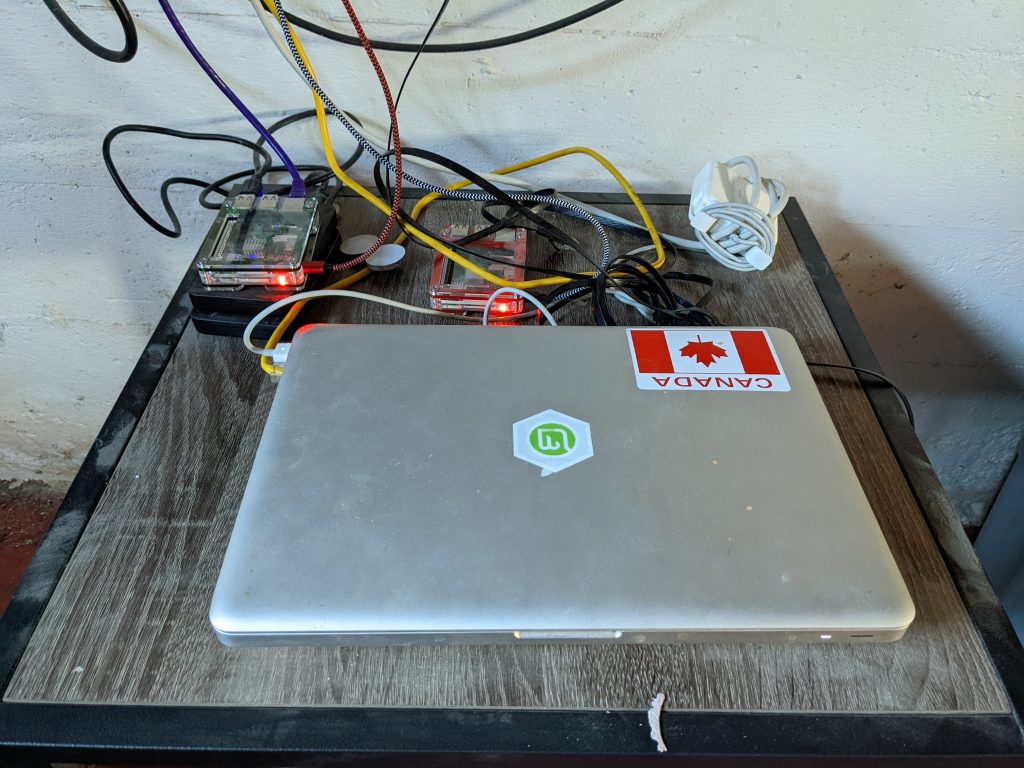
    Currently, the 2008 First Generation Aluminum MacBook is running Ubuntu Server and delivering the content you are looking at. Previously, it had been hosted on one of the Raspberry Pi 3b+ machines you see in the background, but I figured it was time for an “upgrade”. I have an old Dell desktop machine under my desk that I may repurpose to run the upgraded version of Ubuntu LTS, but that is a project for the summer.

    ’

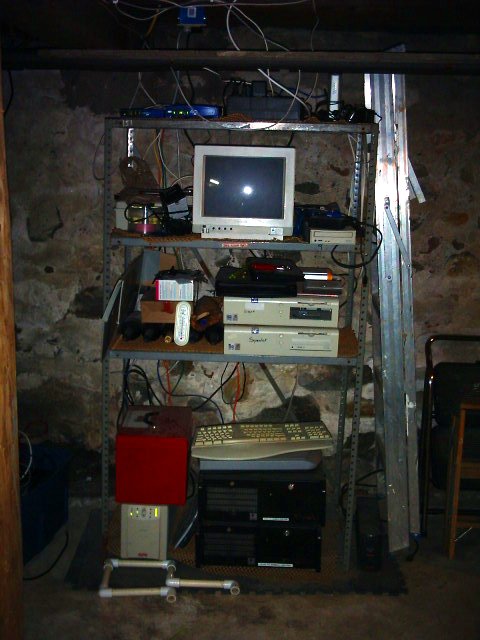
    In the past, back when we lived in Massachusetts, I had a hodgepodge rack of devices ranging from ancient Dell desktops, old server machines, and a bunch of hopes and dreams.

    At least with the new setup, I don’t have to worry about there being an inch of water in the basement after a heavy rain.

    There have been stories around for the last month that suddenly make “old” hardware shiny again – install ChromeOS Flex! Well, that’s not the only use that old machines have.

    Servers can run on just about any platform. Even if it’s just a local DNS or MX server, it doesn’t need to go on the trash heap.

    It’s not just you who can benefit from recycling or donating still working computers and equipment. Not everyone has access to the best and the shiniest, but that may not be what they need. Giving a family an old laptop that can run ChromeOS Flex may make it easier to raise them above the digital poverty line. That old iPhone or Android Device that you aren’t using could make it easier for a family to stay in touch.

    If you aren’t using it anymore, donate or recycle it appropriately. Info on donating and recycling your old hardware is available here.

    Old to you may be amazing to someone else.

  • New Server – New Fun!

    This is the amazing “new” server that this blog is hosted on. Using a dynamic DNS service and Ubuntu on a 9 year-old MacBook, I have taken control of my blog again, trying to revive it from the untouched archive it has been for the last few years.
    [Oh, and if you have arrived here from a Newest Industry link, don’t panic. Just search for the article you want – they’re all here.]

    I’ve just recently changed companies (through an acquisition), so I will have new web performance items to hook into as I get a chance to work with new customers.
    All raise your glass – PerformanceZen is back.

  • MySQL: I was NOT losing my mind…ok, not this time

    I noticed that a new version (4.1.12) of MySQL was up on their site last night. I grabbed the RPMs (Yes, I am a binary-loving weenie, not a hardcore source jockey) and installed them.

    For those of you who install MySQL from RPMs know that it takes 4 packages to get all of the components up and running correctly. I got 3 of the 4 running no problem.

    The one that bombed is the one that contains the main server binaries. All sorts of backtrace and coredump type errors, and then no response from the DB. So I re-installed the previous Server RPM, and I am up and running. I just figured I am an idiot and moved on with my evening.

    This morning, I went to the MySQL site. Lo and behold, all of the 4.1.12 downloads have been pulled.

    I don’t feel like such an idiot anymore. And I am not alone: here are the Severity 1 bugs for MySQL 4.1.12. Two of them are identical to what I was seeing.