Category: Uncategorized

  • Legitimate DNS Hijacking and You

    DNS hijacking is an occurrence that sends fear into the hearts of man and beast. It takes a perfectly harmless (yet critical) process and turns it into a weapon for chaos and mayhem.
    This tool, however, does not simply reside in the hands of people looking to maliciously redirect traffic for purposes I can’t quite fathom – I’ll admit, there is still some simple naivete in my Canadian mind.
    Legitimate companies, ISPs, service providers also have this tool at their disposal for their own purposes. An useful and accepted version of this exists already in the form of content delivery networks (CDNs) and other third-parties who take a portion of a companies domain name space and use it to deliver distributed edge content and computing, web analytics, or advertising services.
    But let’s move this inside the firewall or into the consumer ISP space. These companies provide DNS for millions of customers. As a result, they could easily re-write DNS entries to reflect their own needs rather than those of the consumer.
    In the case of corporate IT networks, there is not much that can be done – they own the wire, hardware and software being used, so they will claim it’s part of the corporate IT policy that all employees sign and that will be that.
    Consumers, on the other hand, should expect free and unencumbered access to the worldwide DNS network, without being intercepted or redirected by their own ISPs. And there is frankly no way to verify that this is not happening unless you run your own caching BIND server on your home network.
    The alternate is to use one of the external third-party services (OpenDNS or DNS Advantage). But these services also provide Phishing and Filtering services, which means that they can easily modify and redirect an incoming request using the most basic and critical service on the Internet.
    While this may sound like the rant of a paranoid, it is a concept that has practical consequences. As an organization, how do you know that you aren’t on the DNS filter list of these providers, or the ISPs? If they can filter and redirect DNS requests, what else are they doing with the information? Are they providing open and trusted access to the core DNS services of the Internet?
    Stepping back as far as you can into the process of going to your favorite pages, you will find that you can’t get there without DNS. And if DNS can no longer be trusted, even from legitimate providers, the entire basis of the Internet dissolves.

  • GrabPERF Agent Update – DNS


    This afternoon, the two GrabPERF Agents at Technorati were switched back to using their local copies of caching BIND for resolving DNS entries.
    Some folks at Microsoft who stopped by to look at their results on the Search Performance Index noticed that there were one or two outliers in the results from these locations. When I investigated, the OpenDNS name servers I was using were returning odd results.
    The reason I had been using OpenDNS is that the local BIND instances were seeing unusual behavior a few months back. So, consider the switch to the local BIND instances probational, pending ongoing review.
    Thanks to Eric Schurman for letting me know.

  • Browsers and Affect on Revenue

    A great follow-up to my post on Browser Stats is this slide deck from Gomez on Online Revenue and Browsers Performance.

    Protect Your Online Revenue – Best Practices For Ensuring Your Web Applications Perform Across Browsers

    NB: I do work for Gomez.

  • Search Referrer Stats – March 21 2009

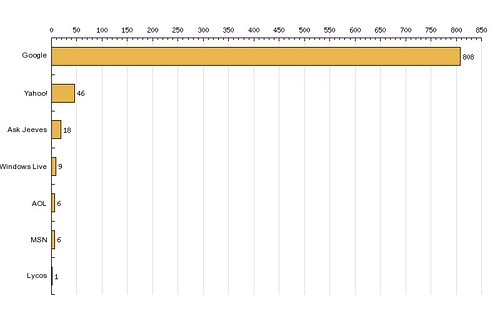
    Via Statcounter, here is my search engine distribution for a log of 2,000 hits.

    search-distribution-march212009

    With statistics like these, is there really any point in having other search engines?

  • GrabPERF Search Index – March 13-19 2009

    About four years ago, I published/posted a number of indices related to GrabPERF data. This is a re-launch of that, starting with the GrabPERF Search Performance Index.
    The methodology of the Search Performance Index is straightforward: A number of key search providers are selected and HTTP GET requests are sent that directly pull the results page of a query page that is searching for ‘New York’.
    This is a simple process and one that is a close approximation of the actual search process that hundreds of millions of people perform every day.

    alias                       Response Time  Success  Attempts  Success Rate
    --------------------------  -------------  -------  --------  ------------
    SEARCH - Google Blogsearch      0.2822545    27242     27244       99.9927
    SEARCH - Google                 0.3151932    27228     27247       99.9303
    SEARCH - Live (Microsoft)       0.3840097    27245     27246       99.9963
    SEARCH - Indeed                 0.4112960    27240     27241       99.9963
    SEARCH - Yahoo                  0.4574381    24175     24175      100.0000
    SEARCH - Altavista              0.4592764    23922     23922      100.0000
    SEARCH - Cuil                   0.6757475    23963     23967       99.9833
    SEARCH - AOL                    0.7822945    23913     23913      100.0000
    SEARCH - Ask                    0.9025220    24157     24163       99.9752
    SEARCH - Technorati             0.9053472    27219     27234       99.9449
    SEARCH - Amazon                 1.3251402    27245     27251       99.9780
    SEARCH - Baidu                  1.7409345    23777     23799       99.9076
    SEARCH - Blogdigger             1.8960633    25106     26354       95.2645
    SEARCH - BlogLines              2.0238809    27233     27248       99.9450
    SEARCH - IceRocket              2.1233684    24147     24177       99.8759
    SEARCH - Blogpulse              2.4144131    27019     27247       99.1632

    As can be seen in the data, there is a substantial degree of difference in the response time results, but the big three search providers (Google, Yahoo, and Microsoft Live) were in the top five. As well, all but three of the providers (Blogdigger, IceRocket and Blogpulse) had success rates (availability) of 99.9% or higher.
    I don’t expect to see much in the way of change in these results, but I will post them for comparison each week.

  • MSIE8 QOTD and other browser war comments

    Here’s what the difference between the companies boils down to: Microsoft is focusing on today’s Web, and the rivals are focusing on tomorrow’s.

    Stephen Shankland via Browser war centers on once-obscure JavaScript

    This sums up many of the comments that I have made about browsers over the months [see Does the browser really matter?]. The browser is not a passive browser any more. It is a Web application portal/container. With MSIE8, Microsoft has not made the leap into the future web.
    It has produced more of the same, and will likely continue to see its percentage of the market drop, at least until Windows 7 rolls with MSIE8 installed as the base browser.
    My final comment is that Windows 7 may not be enough to save Microsoft entirely due to the economic downturn and its effect on the upgrade process within households and corporations.

  • Internet Explorer 8 – Coming to a Site Near You!

    Tomorrow morning, at 09:00 PDT, Microsoft unleashes IE 8.0 on an unsuspecting Internet.
    By 12:00 PDT, the number of Web sites having to put up IE 7.0 only stickers will be in the millions.
    I haven’t done a lot of testing of the new monster (I mainly use Firefox on Mac OS 10.5.6), but it doesn’t seem any weirder than any of the other Microsoft browsers I have used.
    Under the hood, it does amp up the number of connections that are used to download objects, but if your infrastructure is prepared, it should be no big deal.
    The big concern lies in the rendering. If those users who can upgrade to the new browser (anyone not limited to IE 6 by a corporate IT policy written on parchment) do find there are problems, will they blame the site or the browser?
    Have you tested your site to ensure that it actually works with IE 8? Or will you get burned?
    What is the greatest benefit you see to your visitors having IE 8 instead of IE 6 or 7?
    Is this a good thing?

  • Misuse of Round-Robin DNS

    This is a “re-print” of an article I had on Webperformance.org that I notice that a number of people search for.



    See additional information on how not to use Round-Robin DNS.
    The use of Round-Robin DNS for load-balancing has been around for a number of years. It is meant to serve as a way to have multiple hosts with different IP addresses represent the sam hostname. It is useful, but as dedicated load-balancing technology began to evolve, its use began to decrease, as it was not sensitive to the conditions that exist within a server-farm; it simply told clients which IP they should connect to, without any consideration of the condition of the server they were connecting to.
    Recently, I have seen a few instances where companies have switched back to Round-Robin DNS without considering the pitfalls and limitations of this particular method of load-balancing. The most dangerous of these is the limitation, set out in RFC 1035, that a DNS message carried in UDP cannot exceed 512 bytes.

    2.3.4. Size limits
    Various objects and parameters in the DNS have size limits.  They are
    listed below.  Some could be easily changed, others are more
    fundamental.
    labels          63 octets or less
    names           255 octets or less
    TTL             positive values of a signed 32 bit number.
    UDP messages    512 octets or less

    When a UDP DNS message exceeds 512 octets/bytes, the TRUNCATED bit is included in the response, indicating to the client/resolver that not all of the answers were returned, and they should re-query using a TCP DNS message.
    It’s the final phrase of the previous paragraph that should set everyone’s ears a-twitter: the only thing that should be requested using TCP DNS messages are zone transfers between servers. If a someone who is not one of your authorized servers is attempting to connect using TCP to port 53 of your DNS server, they may be attempting to do an illegal zone transfer of your domain information.
    As a result, TCP connections to port 53 are usually blocked inbound (and outbound, if you run an ISP and you assume your users are up to no good). So, guess what happens when the truncated DNS information is re-requested over TCP? Web performance is negatively affected by between 21 and 93 seconds.[1]
    So, simply put, DNS information needs to be tightly managed and examined, to ensure that only the most appropriate information sent out when a DNS query arrives. Using Round-Robin DNS to load-balance more than 5 servers indicates that you should be examining other load-balancing schemes.


    24 April 2003 — Round-Robin Authority Records
    This morning, I spoke with a client who was experiencing extremely variable DNS lookup times on their site after they implemented a new architecture. This architecture saw them locate a full mirror of the production site in Europe, for any potential failover situations.
    This looks good on paper — apparently the project plan ran to eleven pages — but they made one very serious technical faux pas: they deployed two of the authoritative name servers in the UK.
    The DNS gurus in the audience are saying “So what?”. This is because when you set up 4 authoritative DNS servers correctly, the query is sent to all 4 simultaneously and the one with the fastest response time is used. This usually results from the following type of configuration:

    		dns1.foobar.com		10.128.6.2
    		dns2.foobar.com		10.128.17.2
    		ns0.snafubar.com	172.16.12.2
    		ns-ext.barfoo.net	10.250.32.128

    The client this morning, however, had a very different type of configuration.

    		dns.foobar.com		10.128.6.2
    		dns.foobar.com		10.128.6.4
    		dns.foobar.com		172.16.12.2
    		dns.foobar.com		172.16.12.4

    When the authority record is returned in this fashion, the results are easily understood. The host name is the same for all four IP addresses, so the querying name server does what it is supposed to do in these situations: resort to the Round-RObin algorithm. Instead of querying all four name servers simultaneously, the querying name server rotates through the authoritative names.
    Depending on where the authoritative name servers are located, the DNS lookup time could vary wildly. In the case of the client this morning, 50% of the DNS lookups were being routed to the UK, regardless of where the querying name server was located.


    [1] This value varies depending on the operating system. For Windows 2000, the TCP timeout is 21 seconds; for Linux, this value is 93 seconds.


  • New Domains Pointed to Newest Industry

    For a number of years, I have owned three very popular domain names: WebPerformance.org, WebCaching.org, and WebCompression.org. Last night, after many days of consideration, I stopped pointing them at their own distinct Web space and pointed them at this blog.
    This is not a bad or evil thing, considering that for at least 18 months, the articles that were hosted at those sites were duplicated here in a more manageable format.
    For those who have come looking for the content from those sites, it is here. The search box in the right column can help you locate it.
    But for those who would like a refresher, here is a list of the most popular articles on this blog, as selected by Web performance traffic.

    Web Performance Concepts Series

    Why Web Measurement Series

    Web Performance Tuning

    IP Tracking

  • GrabPERF – Search Performance Index

    Today I would like to announce the availability of the GrabPERF Search Performance Index.
    The goal of the index is to provide performance metrics for a group of search providers around the world. The results are based on a direct HTTP GET request being made for the search results page by the GrabPERF Agent.
    Currently only live data is available. In the near future, archival results on a week by week basis will be made available.
    If there is a search provider that has been missed, please contact the GrabPERF team.