Category: Uncategorized

  • Enterprise Shield: The flow and general process

    So, for those who are interested here is the current processing flow and update cycles for my Enterprise Shield and Bot Filtering setup.

    Currently this setup comfortably supports blocking 425,000 CIDR Blocks and 10K AbuseIPDB IPs, with additional processing for cloud providers that depends on the rate they send traffic through.

    Attackers, do what you will.

    Enterprise Shield — Request Processing Flow A three-layer flowchart showing how incoming requests are processed through the kernel SHIELD-LOGIC chain, Apache mod_rewrite UA filter, and WordPress/Wordfence application layer. Inbound request Kernel — SHIELD-LOGIC chain Trusted source? Loopback · ESTAB/RELATED · LAN · CDN IPs AbuseIPDB penalty box? SHIELD_PENALTY ipset — updated 5 times daily (AbuseIPDB Free API) Blocked ASN or country? blocked_asns ipset — rebuilt nightly at 02:00 UTC Known AI crawler UA? GPTBot · ClaudeBot · Google-Extended · others Apache — mod_rewrite UA filter UA block rules? Bot strings · outdated browsers · attack patterns Application — WordPress / Wordfence / PHP Legitimate request served Wordfence WAF evaluates · WordPress delivers content Accept Silent drop AbuseIPDB match Silent drop ASN / country match rDNS verify Accept or drop 403 GO AWAY!

    Enterprise Shield — Component Update Cycles

    Scheduled refresh intervals and out-of-band injection methods for each protection layer.

    🕐 All scheduled times are UTC
    Component What it controls Update cycle (UTC) Out-of-band injection
    blocked_asns ipset Kernel IP ranges for all ASNs in blocklist_asns.txt, resolved via RADB WHOIS using 8 parallel threads Nightly — 02:00
    • Penalty box (temporary): sudo block_asn.sh AS9009 Live inject. Cleared at next 02:00 UTC run.
    • Permanent block: sudo block_asn.sh --permanent AS9009 Writes to blocklist and injects live. Persists forever.
    Country IP blocks Kernel IPv4 CIDRs for blocked countries from the ipverse GitHub feed, merged into the same blocked_asns ipset Nightly — 02:00
    • CIDR penalty box: sudo block_asn.sh --cidr 1.2.3.0/24 Live inject only. Cleared at next 02:00 UTC run.
    • Add country permanently: Edit BLOCK_COUNTRIES in enterprise_shield.sh and re-run. Takes effect immediately; persists.
    SHIELD_PENALTY ipset Kernel Top abusive IPs from AbuseIPDB API (≥ 90% confidence). Evaluated before the ASN chain in iptables INPUT 5x Daily — :00
    • No manual add. The set is atomically replaced each run. To block an IP immediately, use block_asn.sh --cidr <IP>/32 against the main ipset instead.
    • Force early refresh: sudo /usr/local/bin/abuseipdb_penaltybox.sh
    AI bot verifier Kernel Python daemon on NFQUEUE 10. Intercepts known AI crawler UAs (GPTBot, ClaudeBot, Google-Extended) and verifies via rDNS before allowing or dropping On service restart
    • Add a new AI bot UA: Edit the NFQUEUE rules in enterprise_shield.sh, then: sudo systemctl restart shield-ai-bot.service
    • Rebuild the full chain: sudo /usr/local/bin/enterprise_shield.sh
    mod_rewrite UA rules Apache Apache-level .htaccess and VirtualHost rewrite rules blocking by UA string, version ranges, empty UAs, and attack patterns. Returns 403 GO AWAY! inline — no PHP, no WordPress bootstrap Manual
    • Add bot string: Append a RewriteCond to .htaccess, then: sudo apachectl graceful Takes effect immediately with no dropped connections.
    • Update browser version range: Edit the version regex, then run apachectl graceful. Must cover the ESR floor and current version ceiling.
    • IP block at Apache layer: Add Require not ip <addr> to the VirtualHost config.
    Wordfence WAF WordPress PHP-layer WAF bootstrapped before WordPress via waf/bootstrap.php. Independently evaluates every request surviving Apache, checks Wordfence’s threat database, and serves its own 403 pages from wp-content/wflogs/ Automatic Free: 30-day rule delay.
    Premium: real-time feed.
    • Block an IP immediately: WP-Admin → Wordfence → Blocking → Create a Block → Block by IP No server restart required.
    • Add a custom firewall rule: WP-Admin → Wordfence → Firewall → Custom Patterns Can match on IP, UA, referrer, URL, or request parameter.
    • Force rule sync: WP-Admin → Wordfence → Firewall → Sync Firewall Rules
    Boot persistence: shield-ipset-restoreufw.serviceshield-iptables-restoreshield-ai-bot.service. All ipsets and chains restored on reboot. All times UTC.
  • Enterprise Shield on Dinosaur Hardware

    There’s a certain kind of satisfaction that comes from taking something old and making it do something remarkable. This is the story of how a 2008 MacBook 13” aluminum — a machine that predates the iPhone App Store — ended up running a multi-threaded, self-healing, boot-persistent IP threat blocking system protecting a production web server on Ubuntu 24.04. It took a full day of iterative development, a fair amount of debugging, and one very honest conversation about an 18-year-old piece of hardware.


    The Starting Point

    The project began with a script called Enterprise Shield v11.4. On paper it did what it promised: it blocked traffic from hostile Autonomous System Numbers (ASNs) and geographic regions by maintaining a massive ipset of known-bad IP ranges, then dropping packets matching that set at the firewall level. In practice, it was held together with duct tape.

    The first code review found problems at every layer. There was a truncated grep statement in the country block loop — a literal syntax error that prevented the script from ever completing. The leading-zero stripping logic for CIDR normalisation ran in the wrong order, cleaning data after the validation regex had already rejected it. The script injected custom iptables rules directly while also running ufw --force reset, meaning UFW silently wiped those rules on every reload. And perhaps most practically damaging: it fetched IP data for every ASN serially, sleeping two seconds between each query, making a large blocklist a multi-hour operation.

    The objective was clear: fix everything, make it fast, make it resilient, and make it understand its own hardware.


    Understanding the Hardware

    Before optimising anything, we needed to understand what we were working with. The machine is a 2008 MacBook with a Core 2 Duo processor — a 64-bit dual-core chip from the era when 4GB of RAM was considered ambitious. This one has been upgraded to 8GB, which turned out to matter significantly for one specific decision later.

    The Core 2 Duo changes the calculus on parallelism. Modern CPUs handle process spawning cheaply. On a processor from 2008, every subprocess fork is measurably expensive, and context switching between background jobs has real overhead. This shaped nearly every optimisation decision that followed: eliminate unnecessary subprocess forks, use bash builtins instead of external binaries wherever possible, and be conservative with thread counts.

    It also runs Ubuntu Server 24.04, which introduced a subtle wrinkle: the system ships with iptables-nft, a compatibility shim that translates iptables commands into nftables rules. Early in the project we suspected this would break the ipset integration — specifically the --match-set rule that does the actual packet dropping. A quick check of the live chain output confirmed it was working:

    93  5448 DROP  ...  match-set blocked_asns src

    Those 93 drops told us the integration was solid. We moved on.


    Phase 1: Making It Correct

    The first rewrite — v11.5 — focused entirely on correctness before touching performance.

    The truncated grep was fixed. The UFW/iptables conflict was documented and mitigated by injecting the ipset DROP rule into /etc/ufw/before.rules, making it survive UFW reloads. The leading-zero stripping was reordered so it ran before validation, not after. The ipset restore file was given a flush directive so stale entries from previous partial runs couldn’t accumulate. The country feed fetches were given --fail flags so 404 error pages didn’t silently pass through as IP data.

    Most importantly: the script was given a proper trap ... EXIT so temp files were always cleaned up, the root check was moved to the absolute first line, and every (( counter++ )) was replaced with counter=$(( counter + 1 )) — because in bash, arithmetic that evaluates to zero returns exit code 1, which set -e interprets as a fatal error.


    Phase 2: Making It Fast

    With a correct foundation, the next challenge was the whois lookup bottleneck. The serial version queried RADB one ASN at a time with a two-second sleep between each. With 152 ASNs in the blocklist, that’s over five minutes of wall clock time before any actual data processing begins.

    The first parallel version — v11.6 — used export -f to pass a bash worker function into xargs -P subshells. It looked right. It wasn’t. On many systems, xargs subshells don’t reliably inherit exported bash functions. Workers spawned successfully, registered their completion files, and wrote nothing. The blocklist came back at roughly one-third of its expected size. The failure was completely silent.

    The fix was architectural. Instead of relying on function inheritance, the worker logic was written to a self-contained bash script at runtime — /tmp/shield_whois_worker.sh — and each background job executed that file directly. No inheritance, no environment dependencies, no silent failures.

    The second parallel problem was subtler: all threads were hitting RADB simultaneously, triggering connection throttling that caused empty responses with no error code. RADB doesn’t say “rate limited.” It just stops returning data. The solution was per-worker random jitter (0–2.5 seconds) combined with inter-batch pausing — every 20 dispatches, all active workers drain and a 3-second pause lets RADB’s connection count settle before the next batch opens.

    The final thread count settled at 4. Eight threads was causing the silent data loss. Four threads with batching gives full coverage with no throttling, and on a Core 2 Duo the overhead of managing 4 concurrent background jobs is well within budget.


    Phase 3: Making It Resilient

    A firewall system that runs once nightly creates a specific failure mode: if something goes wrong with a data source — RADB is slow, a country feed returns an error, the network hiccups — the next scheduled run could silently shrink the blocklist without anyone noticing.

    The delta check was the answer. After every run, the entry count is written to /var/lib/shield/last_entry_count. The following night, before committing the new ruleset, the script compares. If the new count is more than 10% below the previous run, the atomic swap is aborted entirely — the existing live ipset is preserved untouched — and an alert is written to a separate log file.

    “Atomic swap” is the key phrase here. The shield script never modifies the live ipset directly. It builds a complete replacement set in /tmp, populates it, then executes ipset swap blocked_asns-temp blocked_asns — a single kernel operation that is instantaneous and never leaves the firewall in a partially-updated state. The machine is always either running the old ruleset or the new one. There is no window where it’s running neither.


    Phase 4: Surviving Reboots

    This is where the project surfaced its most interesting architectural gap.

    The ipset kernel module stores its data entirely in memory. Every reboot wipes it. The script saves a snapshot to /etc/ipset.conf after each run, but nothing was loading that snapshot back on boot. The result: after every reboot, the machine came up with an empty blocked_asns set. UFW loaded its rules, including the DROP rule that referenced blocked_asns — but the set it referenced didn’t exist. Traffic flowed freely until 2AM when the cron job fired.

    The fix required two systemd services with precise ordering:

    shield-ipset-restore.service   (Before ufw.service)
        └── ufw.service
              └── shield-iptables-restore.service  (After ufw.service)

    The ipset service runs before UFW and loads the saved set. The iptables service runs after UFW and rebuilds the custom SHIELD-LOGIC iptables chain using iptables-restore --noflush, which merges the saved rules into UFW’s ruleset without disturbing UFW’s own chains.

    Both services include first-boot guards: if their respective state files don’t exist yet (fresh install before the first cron run), they exit cleanly rather than failing and potentially delaying UFW startup.

    After the first reboot with both services running, verification was clean:

    Active: active (exited)   ← correct for a oneshot service
    status=0/SUCCESS
    shield-ipset-restore: blocklist restored from /etc/ipset.conf

    Phase 5: The Operational Tooling

    A blocking system is only as useful as its ability to respond to threats that aren’t in the scheduled blocklist. The companion tool — block_asn.sh — evolved through five versions across the session.

    The original script had several problems: it saved to the wrong path (meaning penalty box entries vanished on reboot), it validated IP addresses with a pattern that accepted octets above 255, and it made one kernel call per route which was painfully slow for large ASNs.

    The rewrite introduced two distinct modes:

    Penalty box — adds ASN routes directly to the live ipset. No file writes. Effective immediately. Cleared automatically on the next 2AM cron run when the ipset is rebuilt from scratch.

    Permanent — does everything the penalty box does, plus appends the ASN to /etc/blocklist_asns.txt with a timestamp and an operator-supplied reason note. Persists forever.

    Later, a third mode was added: --cidr accepts a single IP range for penalty box injection. CIDRs are never written to the permanent blocklist by design — they’re too specific and ephemeral for a long-term list.

    The most important optimisation was replacing the per-route injection loop with a single ipset restore call. For a 500-route ASN, the old approach was 500 process forks and 500 kernel netlink calls. The new approach is one of each. The practical difference is roughly 5 seconds versus 50 milliseconds.

    A before/after entry count snapshot provides transparent reporting on every injection — you know exactly how many routes were genuinely new versus already present.


    The Bug That Was Hiding Everywhere

    Late in the project, a test with CIDR 186.179.0.0/18 failed validation with “Invalid CIDR.” Tracing through the normalisation pipeline revealed a bug that had been quietly corrupting data all along.

    The perl zero-stripping substitution s/(^|\.)0+\./$1./g was intended to fix malformed octets like 023.23. from RADB output. Instead, it matched any zero octet followed by a dot — including valid ones. 103.0.0.0/24 became 103..0.0/24. 5.0.0.0/8 became 5..0.0/8. Both silently failed validation and were dropped.

    Every network with a zero in a non-terminal octet position — and there are many — had been invisible to the blocklist since the normalisation code was written.

    The fix changes 0+ to 0+([0-9]), requiring the match to include at least one additional digit after the leading zeros. Lone zeros are left alone. The fix was applied to both enterprise_shield.sh and block_asn.sh.

    # Before (broken)
    perl -pe 's/(^|\.)0+\./$1./g'
    
    # After (correct)
    perl -pe 's/(^|\.)0+([0-9])\./$1$2./g'

    Results

    At the end of the session, the system was running with:

    • 343,966 blocked IP ranges loaded in the live ipset, consuming approximately 9.8MB of kernel memory
    • Boot-persistent protection — full blocklist restored within 3 seconds of kernel start, before UFW processes its first rule
    • Nightly automated updates at 2AM with delta checking, atomic swaps, and structured logging
    • On-demand injection for immediate response via block_asn.sh
    • Full documentation covering installation, operation, monitoring, and uninstall

    The final cron run after all fixes produced:

    [INFO ] --- Run complete: status=SUCCESS entries=343966 elapsed=76s ---

    76 seconds. On an 18-year-old machine. For a complete rebuild of a 344,000-entry firewall blocklist from live external data sources.


    What Made It Work

    Looking back across the session, a few principles drove the outcomes:

    Fix correctness before optimising. The original script had bugs that would have made any performance work meaningless. Getting it right first meant the parallel version had a solid foundation to build on.

    Understand the failure modes of your tools. export -f failing silently. RADB returning empty responses instead of errors when rate-limited. ipset restore erroring on an existing set without -exist. None of these produced clear error messages. Each required understanding what the tool was supposed to do versus what it actually did under pressure.

    Instrument everything. The structured logging, delta checks, and before/after entry counts weren’t cosmetic additions. They were what allowed us to diagnose the shrinking entry count issue (thread pressure), the double-logging issue (cron redirect + direct file append), and the missing public IP (lookup happening during UFW teardown).

    Respect the hardware. Reducing threads from 8 to 4, using bash builtins instead of forking date on every log line, sorting in RAM with a 1GB buffer — these decisions were driven by understanding that a Core 2 Duo is not a cloud VM. It has constraints. Working within them produced a faster, more stable result than ignoring them.


    The Machine

    The 2008 MacBook 13” aluminum is not a recommended platform for production server workloads. It draws more power than a modern ARM server, runs warmer, and has a shorter remaining hardware lifespan than purpose-built server equipment.

    It’s also, as of this writing, blocking nearly 344,000 hostile IP ranges, rebuilding its blocklist every night, surviving reboots gracefully, and responding to threats on demand in under a second.

    Sometimes the best server is the one you already have.
  • The overuse of no-store in Cache-Control Headers

    Many of the sites that I work with have this habit of using a browser Cache-Control header without fully understanding what it means:

    cache-control: max-age=0, no-cache, no-store, private

    Everything in that header is moot once no-store is added, as Cache-Control rules always default to the most restrictive directive in the list. So the effective set of caching rules defined by that group of directives equals

    cache-control: no-store

    Now, the issue comes when the visitor refreshes the page. They do not get the opportunity to REVALIDATE the content, as the browser has been told to completely block the content from being stored anywhere.

    If the goal is to actually force a visitor to REVALIDATE the content on every page view, then use this instead:

    cache-control: max-age=0, no-cache, private

    While this set of directives would seemingly prevent any caching, its actual objective is to force the browser to process the content as if it is stale, and send an if-modified-since (including any relevant ETag information) to the server confirming if the content it has stored in a transitory state is still valid.

    Performance a REVALIDATE rather than a full load reduces the amount of data transferred between client and server and can improve performance and reduce CDN costs, especially at scale.

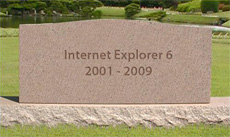
  • MSIE6 Euthanized. Rejoicing Among Web Developers Begins.

    It’s official. According to the IE Dev Blog at MSDN, MSIE8 will be the direct upgrade path via Windows Update in the third week of April. [here]
    I discussed the slow decrease in MSIE6 browser share earlier today, but it is not occurring fast enough for my liking. It is a browser from what seems like a generation ago.
    To give you some idea of why MSIE6 should gently euthanized, when it was a shiny new browser:

    • Facebook, MySpace, GMail, and YouTube did not exist
    • You could count the number of bloggers (remember them?) on one hand
    • UserLand was the primary blogging tool. Or a text editor.
    • Scoble didn’t work for Microsoft
    • Excite and AltaVista were still viable search engines

    Is it too early to write a redirect rule to direct MSIE6 users to a page telling them to upgrade to view content?
    [Image courtesy of CreativeBits]

  • Browser Wars: StatCounter Data for North America

    Tracking browser penetration and market share has become a new obsession with me. With 2009 shaping up to be the year of the browser container, the choices that people make will affect the development of Web technologies for the next few years.
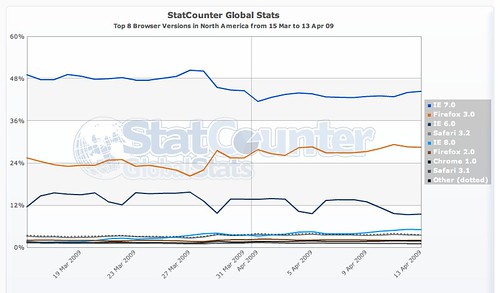
    So far, the only new player to come out of the gate as a production release is MSIE8. Since March 19, MSIE8 has seen a slow and steady increase in market share, at least in North America. This has occurred, as I have noted previously, without the support of Windows Update, which will drive millions of users to automatically upgrade their systems.

    NA-browser stats-MAR15-APR132009

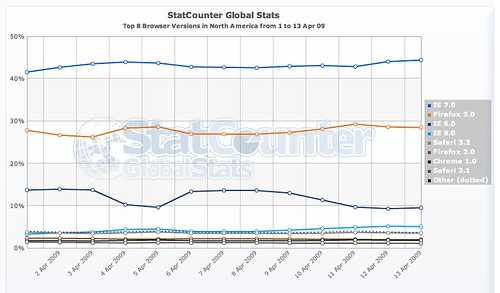
    What can be seen in this data from StatCounter is that MSIE8 is finally (Thank [insert deity or supernatural object here]!) taking market share away from MSIE6. As the corporate browser of choice (mainly because IT departments don’t have the resources or initiative to sign-off on MSIE7), MSIE6 is the default platform that all developers are forced to lower their standards to.
    One can hope that IT departments will allow their customer base to make the leap directly to MSIE8 from MSIE6. We can all celebrate now, as the StatCounter data now shows that MSIE6 has dropped below 10% market share.

    NA-browser stats-APR1-132009

    What is more interesting is that Firefox 3.0 made a serious encroachment into MSIE7 near the end of March. I am not aware of what may have caused this, and would be interested to hear if the StatCounter team has any insight into why this may have occurred.

  • Scaling Web Analytics – Considerations for Consumers

    A comment on my Hit Tracking with PHP and MySQL post raised some interesting questions about what a consumer of Web analytics data needs to consider when selecting providers for their sites.
    Most folks are familiar with the model of Web analytics vendors: You place their JS tag on your page which makes a call back to their centralized system with all of the data that can be collected about the visitor who has just come to your site.
    There are three items that you, the consumer of this third-party service, need to get straight answers about.

    Performance of the Tag

    Visitors to your site do not know which components you are responsible for and which you have farmed out to vendors and services. In their mind, all content is your content. This means that the performance of the Web analytics tag, which if not placed correctly on the page can affect the rendering of the content, is a critical factor in selecting a vendor.
    To my knowledge, none of the Web analytics vendors used by most people blog and social media firms (StatCounter, GetClicky, Google Analytics, Omniture, etc.) freely share response time and error rate metrics of their tag infrastructure with the world as measured by a third party.
    Is the tag delivered from a central location, or does the provider use a CDN? Is the data delivered asynchronously or synchronously?
    The download performance of the tag is not the only concern. Ask them to provide data on the average processing time that they see when a client parses and processes the code. How does this processing time vary from browser to browser, between OSs? What steps are they taking to ensure that the tag does not affect the perceived performance of your page?
    Ask for this data. Ask that the measurement data be collected by an impartial third party. Demand that this data be freely available to you before you make a decision on purchasing their service.

    Size of the Tag

    All of these services rely on a JS tag to collect and deliver the data to their data warehouse. Ask the provider to tell you how large this tag is, and what steps they have taken to reduce its size so that it has a limited effect on the download of your content.
    Have they minified the tag? Is it delivered using HTTP compression to further reduce the size? Are ways to reduce the size of the tag always under considerations?

    Data Storage

    Analyzing data takes a couple of forms: daily operational views to spot changes or issues; and long-term trending to find larger patterns and major shifts in your visitors. As a result, data needs to be available with a substantial degree of detail while still providing aggregated data that allows larger patterns to be easily discovered.
    How long does your provider store detailed data? What is the data expiry policy? Can you extract the data and import it into your own database?

    Summary

    Web analytics is key to determining what works and doesn’t work on your site. It tells who, where and how people are accessing your content. But without a Web analytics partner/vendor that provides performance and support, you may be left more in the cold than if you were just looking at your raw Web logs.

  • IPV4 and Registrar Data – April 10 2009

    From my IPV4 database, here are the the Registrar and Country statistics as of April 10 2009.

    Since the last update, ARIN has crossed the 1.6B IPV4 address boundary, adding nearly 5M IPV4 Addresses. APNIC matched this growth by adding an additional 5M new addresses of its own.

    Registrar      Number of IPV4 Adresses
    ---------      -----------------------
    arin                    1,600,640,000
    ripencc                   564,850,616
    apnic                     528,362,496
    lacnic                     79,931,136
    afrinic                    21,526,272

    The majority of the growth in APNIC continues to be driven by China, which added an additional 4M IPV4 addresses since March 14.

    Country                                     Number of IPV4 Adresses
    ------------------------------------------  -----------------------
    UNITED STATES                                            1472741888
    CHINA                                                     191119104
    JAPAN                                                     152412672
    EUROPEAN UNION                                            114155680
    GERMANY                                                    85174424
    CANADA                                                     75846144
    KOREA, REPUBLIC OF                                         72142592
    UNITED KINGDOM                                             70675288
    FRANCE                                                     68370880
    AUSTRALIA                                                  36573184
    ITALY                                                      32202432
    BRAZIL                                                     29754880
    TAIWAN, PROVINCE OF CHINA                                  24680704
    RUSSIAN FEDERATION                                         24529224
    SPAIN                                                      21794976
    MEXICO                                                     21504000
    NETHERLANDS                                                21290792
    SWEDEN                                                     18982304
    INDIA                                                      18285568
    SOUTH AFRICA                                               14009344
    POLAND                                                     13869704
    TURKEY                                                     10417600
    DENMARK                                                     9281632
    FINLAND                                                     8932864
    ROMANIA                                                     8640512
    SWITZERLAND                                                 8249320
    HONG KONG                                                   8206848
    NORWAY                                                      7425584
    AUSTRIA                                                     7290592
    ARGENTINA                                                   7239424
    INDONESIA                                                   6997248
    VIETNAM                                                     6707456
    BELGIUM                                                     6412416
    NEW ZEALAND                                                 6115072
    CZECH REPUBLIC                                              6040960
    UKRAINE                                                     5507904
    THAILAND                                                    4743936
    CHILE                                                       4731136
    PORTUGAL                                                    4473952
    SINGAPORE                                                   4410880
    COLOMBIA                                                    4261632
    IRELAND                                                     4203680
    MALAYSIA                                                    4147456
    PHILIPPINES                                                 4070656
    ISRAEL                                                      3949760
    GREECE                                                      3834624
    HUNGARY                                                     3716480
    VENEZUELA                                                   3693056
    BULGARIA                                                    3334912
    EGYPT                                                       2731008
    SAUDI ARABIA                                                2703616
    UNITED ARAB EMIRATES                                        2286848
    LITHUANIA                                                   2009216
    IRAN, ISLAMIC REPUBLIC OF                                   1894400
    PERU                                                        1715968
    PAKISTAN                                                    1637632
    CROATIA                                                     1623136
    SLOVAKIA                                                    1611520
    COSTA RICA                                                  1502208
    LATVIA                                                      1384448
    SLOVENIA                                                    1277952
    PANAMA                                                      1130240
    MONTENEGRO                                                  1083648
    ESTONIA                                                     1021464

    As China’s Internet growth continues, the number of addresses assigned to ISPs in that nation will continue to grow. However, it is unlikely that China will equal or exceed the US mainly due to the movement to mobile devices, which will be managed using private IP space rather than public IPs.

  • Why Chrome 2.0 Dev was Deleted

    I deleted Chrome 2.0 from my system on Friday for one very powerful reason: When it is installed, it makes itself the default browser.
    Its performance gains and light weight were impressive. But its invasion of my system was uncalled for.
    No matter which browser you set to be the default browser, Chrome 2.0 prevents that browser from regaining control. If you click a link in another program, Chrome launches, even if you set MSIE or Firefox or Safari as the default browser.
    I thought that kind of behavior was behind browser manufacturers.

  • The Rise of MSIE 8


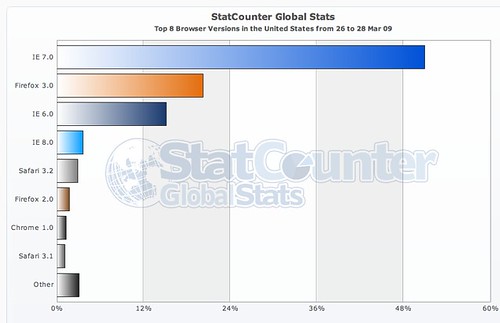
    In the 10 days since its public release, MSIE8 has made a run up the charts. Courtesy of the great folks at StatCounter and their public analytics data, this growing browser share for MSIE8 can be easily followed.
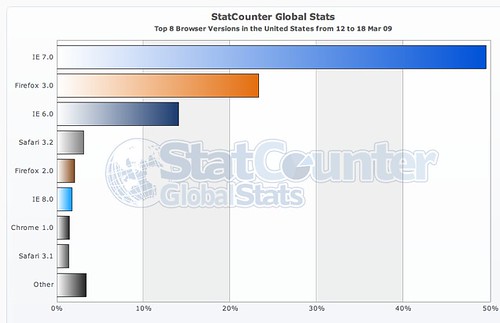
    In the US, prior to its release, MSIE8 RC1 was in sixth position behind even the old battleship Firefox 2.0, but ahead of Chrome 1.0.

    msie8-week-mar12-182009

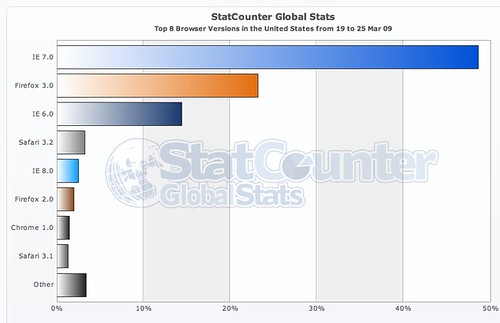
    In the week following its release, MSIE has quickly surpassed Firefox 2.0 browser share in the US. I am not really sure who these Firefox 2.0 users are, but they and the MSIE6 users must be found and encouraged to immediately upgrade.

    msie8-week-mar19-252009

    The values for the first week don’t tell the entire story. As it enters its second week of general availability, MSIE8 continues to increase its share of the browser market, moving into fourth place in StatCounters US stats, overtaking Safari 3.2.

    msie8-week-mar26-282009

    What does t his mean? While it still has a long way to go before it comes close to approaching even the dinosaur, MSIE6, it has to be said that this growth in MSIE8 browser share has occurred without the use of Windows Update. People are making a conscious decision to switch to and use MSIE8.
    Site and application designers will need to take heed – MSIE8 compatibility initiatives will have to be in place yesterday rather than some vague time in the future.

  • GrabPERF Updates being planned – Hostname Resolution Data


    Tonight, I figured out how to add the Resolved IP Addresses for a host to measurement data and store that information for further debugging. It was very simple – I was trying to find complex solutions to this issue.
    Turns out the solution is built right into PERL: The Socket module.
    My thought is that I will update the table with the test config with three new columns:

    • HTTPS/HTTP
    • Hostname
    • Page information

    There will likely be a new table that joins with the raw data on

    • Date
    • Agent_id
    • Test_id

    And contains a comma-delimited list of all the IP addresses that the agent resolved the hostname to at the test time. This lookup will be run after the measurement, so the DNS lookup component of the measurement is not compromised.
    I don’t have an ETA on this, as I want to test it fairly thoroughly before I expose the data. Adding the columns to the test config table will be transparent, but agent modification will need to be verified and then rolled out to all of the folks hosting measurement locations.
    What problem does this provide a solution to?
    It is vital for firms who use geographic load balancing and CDNs to verify that their data is being served from location appropriate IP addresses. I will be able to tie the information collected here into the IP-Location data I collect for other purposes and help companies ensure that this is being done.